
Discovery & Audit
We sit with every role, at every desk. We watch how work actually gets done: every tool, login, spreadsheet and workaround. You get a clear map of where the hours go.
- Shadowing & interviews
- Tool & licence inventory
- Time-leak map
Analyze your business. Build efficiency. AI implementation & execution.
We analyze your business, find the minutes lost in every click, and build your efficiency with the tools you already own. We stay with you week after week, implement AI where it pays off, and build custom software only when you truly need it.
We set up, connect and train teams on the tools they already use
The real problem
An email that takes six minutes instead of forty seconds. Data typed twice into two systems. A report someone rebuilds by hand every Monday. Nobody notices, because it’s “just how we do it.” Multiply it across a whole team and a whole year, and it’s the biggest hidden cost in the business.
We go over everything: how your people use their computers, every program, every step. Then we show them the better way, and we stay until it sticks.
Move the sliders. This is your own estimate, not a promise.
Based on 230 working days a year.
What we do
We analyze your business. We build your efficiency. We implement AI. And when nothing off the shelf fits, our developers build it.
We sit with every role, at every desk. We watch how work actually gets done: every tool, login, spreadsheet and workaround. You get a clear map of where the hours go.
Weekly sessions with your teams and a monthly review with leadership. Good habits stick because someone is there every week to follow up.
Most companies already own the right tools; they're just set up wrong. We configure what you have: templates, rules, shortcuts, automations and integrations.
We implement AI where it pays off today. We build it into your real workflows, execute the roll-out with your team, and put every new update to work as it ships.
When off-the-shelf won't fit, our in-house team of four developers builds it: internal tools, dashboards, reconciliation engines, integrations.
Running on EOS? We plug straight in. Scorecard numbers, Rocks and L10 issues become software fixes and documented processes.

How we work
A clear path from “how do you work today?” to a company that runs lean, with a decision at month six you can trust.
We shadow your people, interview each team, and inventory every tool, licence and spreadsheet in play.
Every workflow is mapped and timed, click by click. You get a prioritized list: what to fix first, and what it's worth.
We set up the tools you already own and train your team on the faster way. Quick wins first, so the change pays for itself early.
Weekly sessions with your teams, a monthly review with leadership. New software updates and AI features get rolled in as they land.
After six months beside you, we can tell you with confidence: keep it, switch to something better, or build custom. If it's build, our developers take it.

What changes
When every person uses their tools well, it adds up. Some of the companies we work with have run leaner and taken on more customers with the same team.
Selected work
And we keep updating it as their business and the technology move.
Carrier commission statements arrive as PDFs and spreadsheets, each in its own format. Checking them line by line against the agency system was slow, manual work every month. We mapped the workflow, found nothing off the shelf that fit, and our team built DB Commission.
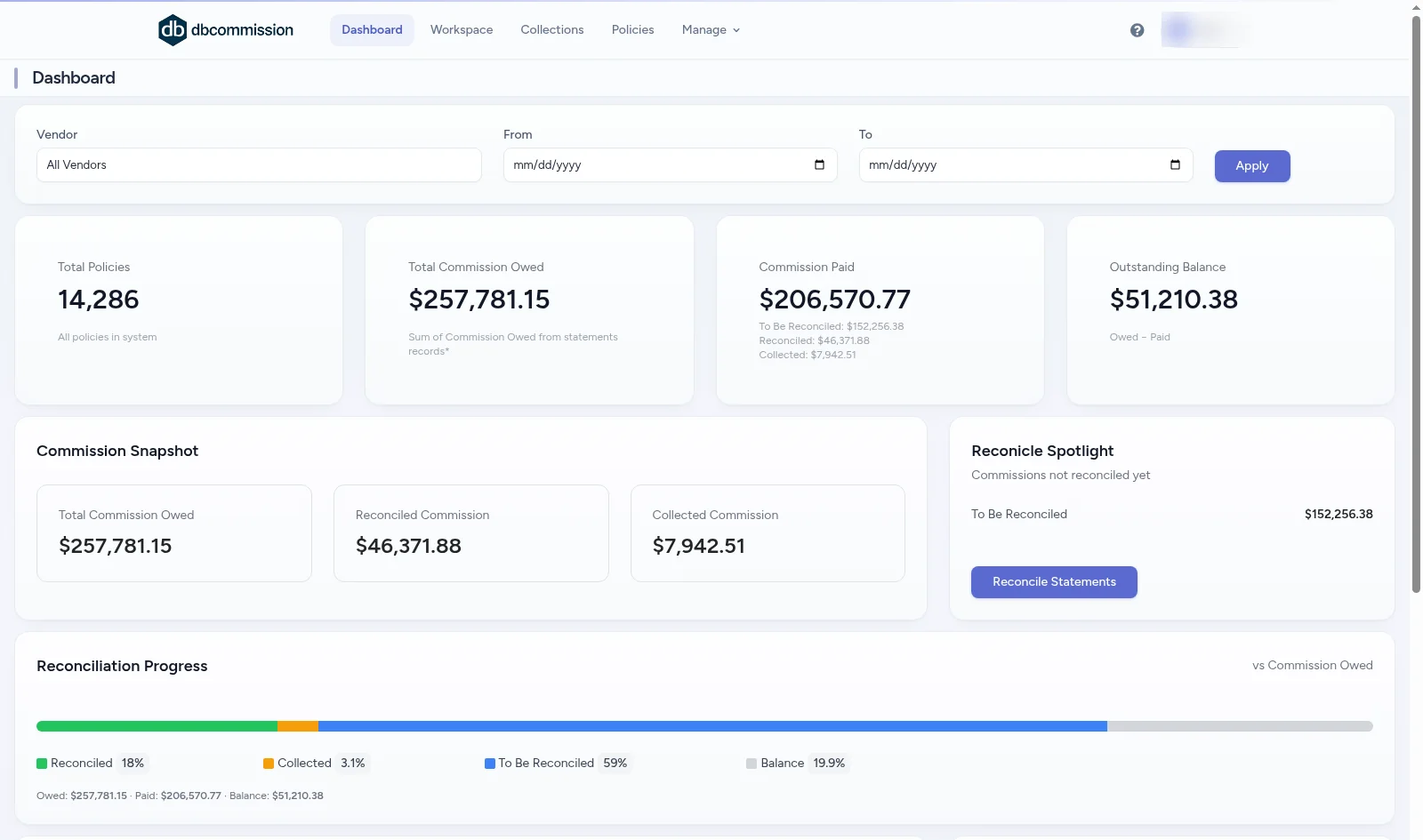
Real screens. Client and policy details blurred.
Claims data lived inside eClinicalWorks reports, and leadership needed a daily view across every location. Instead of replacing their system, we guided them to Power BI as the reporting layer, and our developers built the RCM sync program that feeds it every day. Two parts, one system: the sync keeps the data complete, and the reports turn it into decisions.
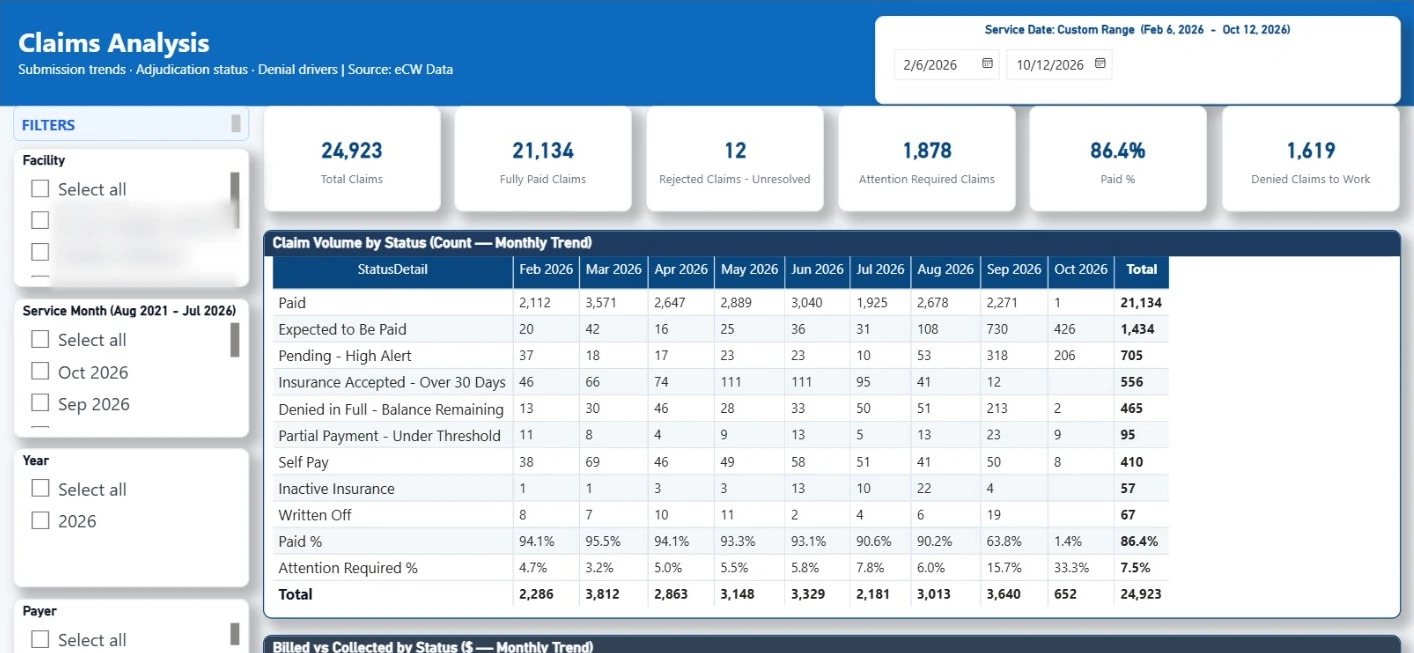
Real screens. Facility and payer names blurred.
We sat with the studio to see how projects really move: tasks for every drawing set, proposals, documents, meetings and client concept boards. Off-the-shelf project tools didn’t fit that flow, so our team designed and built a system around it, page by page.
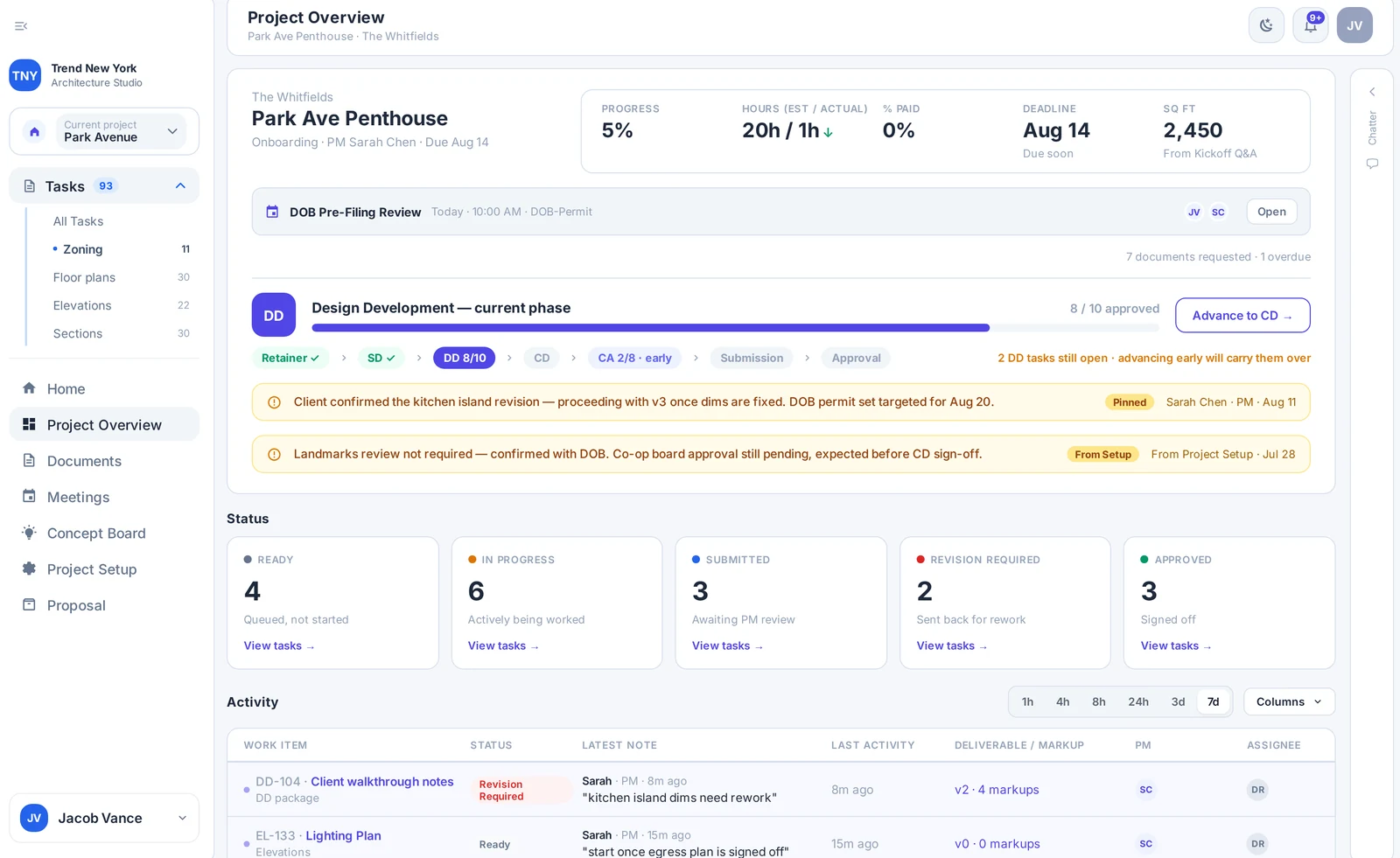
Real screens from the app, shown with sample data.
AI implementation & execution
AI moves every week. Your team doesn’t have time to follow it. We do. We pick what works now, implement it safely in your real workflows, and execute every update as new versions and features land.
Example briefings

EOS alignment
Many of our clients run on the Entrepreneurial Operating System. We fit right in: we work inside your rhythm and make the Data, Process, Issues and Traction parts of your business run on software that actually works.
EOS® and the Entrepreneurial Operating System® are trademarks of EOS Worldwide. Setup Group is an independent firm and is not affiliated with EOS Worldwide.
Who you work with
Founder & Lead Business Analyst
Jacob sits with your team, learns how the business really runs, and turns that into a plan: what to set up, what to change, and what to build. He stays on as your guide while software and AI keep moving.
Four developers
Web apps, data and reporting, integrations and automation. They build from requirements written by the people who sat with your team.
FAQ
Usually not at first. Most of the time the tools you already pay for can do far more once they're set up properly and your team knows how to use them. We only recommend custom software when we've seen, over months, that nothing off the shelf fits.
Discovery takes a few weeks. After that we follow along with weekly team sessions and monthly leadership reviews. Around six months in, we give you a clear call: keep, switch or build. Many clients keep us on after that to stay current.
Only if it clearly pays off. Switching costs time and goodwill, so our first move is always to get more out of what you already have.
Yes. We work alongside EOS companies: your Scorecard, Rocks and L10 issues become concrete software fixes and documented processes, and we stay in your rhythm.
Our own in-house team of four developers. We stay your business analysts the whole way: we write the requirements from what we learned sitting with your team, and we keep the software updated afterwards.
Practically. We show your team what AI can do well today in your actual workflows, set it up safely, and brief you as new updates and capabilities arrive: “another update, here's what to do.”
We work inside your systems with the access you grant, and only as much as the job needs. Happy to sign your NDA before discovery starts.
Book a discovery call. We'll talk through how your team works today and whether we're a fit. No obligation.
Let’s talk
Book a discovery call. We’ll talk about how your team works today, where the time goes, and whether we’re the right fit.